Adobe Podcast
AI-powered audio tool that makes any voice recording sound like a professional podcast.
Category:
Content CreationPricing:
Freemium
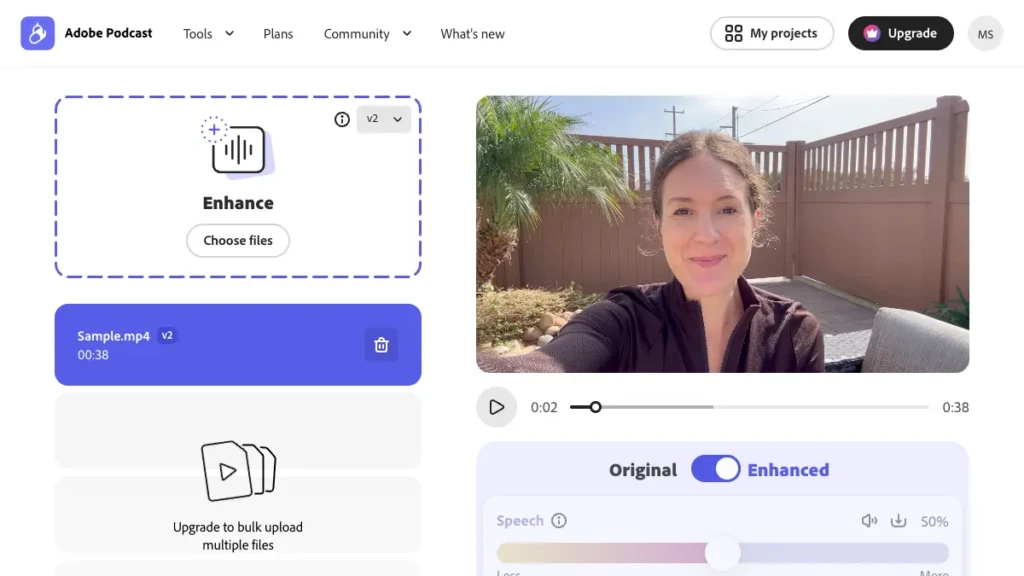
AI-powered audio tools to record, edit, and enhance your voice with studio quality.
Adobe Podcast is a browser-based suite of AI audio tools built for podcasters, YouTubers, educators, and remote interviewers who need to salvage rough recordings without touching a traditional DAW. It targets the persistent Content Creation problem of poor audio quality – background noise, echo, and inconsistent levels – that plagues recordings made outside a professional studio. The flagship feature, Enhance Speech, uses AI trained on thousands of hours of clean studio audio to reconstruct voice tracks so they sound as if they were captured in a sound-treated booth. This makes it a go-to free Audio and Podcasting utility for anyone working from home offices, noisy cafes, or laptop microphones.
The suite is designed for maximum ease of use and requires no specialized hardware. It runs directly in a modern web browser with no downloads needed, and works with any standard microphone, including those built into laptops or phones. Core functions are one-click operations with virtually no training curve. On data and security, Adobe Podcast adheres to enterprise-level standards: all audio is processed on Adobe’s secure cloud infrastructure under Adobe’s broader privacy policy. The service scales from individual creators to large teams and plugs into the wider Adobe Creative Cloud ecosystem, most notably Adobe Premiere Pro, where Enhance Speech can be applied directly to clips on a video timeline for real Productivity gains during post-production.
One caveat worth noting before you commit: the Enhance Speech V2 model, while a clear step up over V1, can occasionally produce an over-processed, slightly robotic tone at full strength, particularly on already-clean recordings. Premium users can dial back the enhancement with a strength slider for more natural results, but free users do not get that control. Think of it as a rescue tool for flawed recordings rather than a finishing polish for pristine ones.
"The end result of using Adobe Enhanced Speech 2 is that your podcast sounds as if it was recorded in a proper studio."
- Graham Barlow, TechRadar, November 2024
"Podcasts are booming, and Adobe's latest AI speech enhancement tool is giving them more polish."
- TIME Magazine, Best Inventions of 2025, October 2025
 Key Features:
 Key Features:
- Enhance Speech: AI-powered tool that removes background noise and echo to make voice recordings sound professional.
- Mic Check: AI analysis of your microphone setup that provides personalized tips to improve your recording quality.
- Web-based Studio: Record and edit multi-track audio directly in your browser with no software to install.
- Transcript-based Editing: Edit your audio by simply editing the auto-generated text transcript, like a word document.
- Remote Recording: Easily invite guests to join your recording session with a simple link.
- Premiere Pro Integration: Apply the Enhance Speech feature directly to audio clips on your timeline within Adobe Premiere Pro.
 Why Use Adobe Podcast?
 Why Use Adobe Podcast?
- Achieve Professional Sound: Make your voice recordings sound like they were recorded in a professional studio, regardless of your environment.
- Save Time and Money: Avoid spending hours manually cleaning audio or hiring expensive audio engineers.
- No Technical Skills Needed: The tools are designed to be extremely intuitive, making high-quality audio production accessible to everyone.
- Improve Your Workflow: Record, edit, and enhance all in one place, with seamless integration for video editors using Premiere Pro.
- Collaborate Effortlessly: The remote recording feature simplifies the process of creating interview-style podcasts with guests from anywhere.
 FAQ
FAQ
 FAQ
FAQWhat is Adobe Podcast?
Adobe Podcast is a web-based suite of AI-powered audio tools designed for podcasters and content creators. Its main features include Enhance Speech for noise removal, transcript-based editing, and remote recording capabilities.
What makes Adobe Podcast different from Descript?
Adobe Podcast's 'Enhance Speech' is widely considered the industry best for one-click audio cleanup. Descript offers a more comprehensive all-in-one platform with advanced video editing, overdubbing, and filler word removal, acting as a complete content production suite.
Is Adobe Podcast free or paid?
Adobe Podcast operates on a freemium model. Key features like Enhance Speech are available for free with daily limits. Full, unlimited access to all features is included with the Adobe Express Premium subscription.
Does Adobe Podcast offer integrations?
Yes, Adobe Podcast integrates directly with Adobe Premiere Pro. Editors can use the Enhance Speech feature on audio clips from within their Premiere Pro timeline, streamlining the video production workflow.
How does Adobe Podcast handle privacy?
As an Adobe product, it adheres to the company's robust privacy policy. Audio files are uploaded to Adobe's secure cloud servers for processing, and users retain ownership of their content. Adobe may analyze content to improve services, subject to user settings.
Level up your Content Creation workflows
Explore Adobe Podcast
Official website