Cursor
AI-powered code editor boosts productivity with natural‑language prompts
Category:
Development & CodingPricing:
Paid
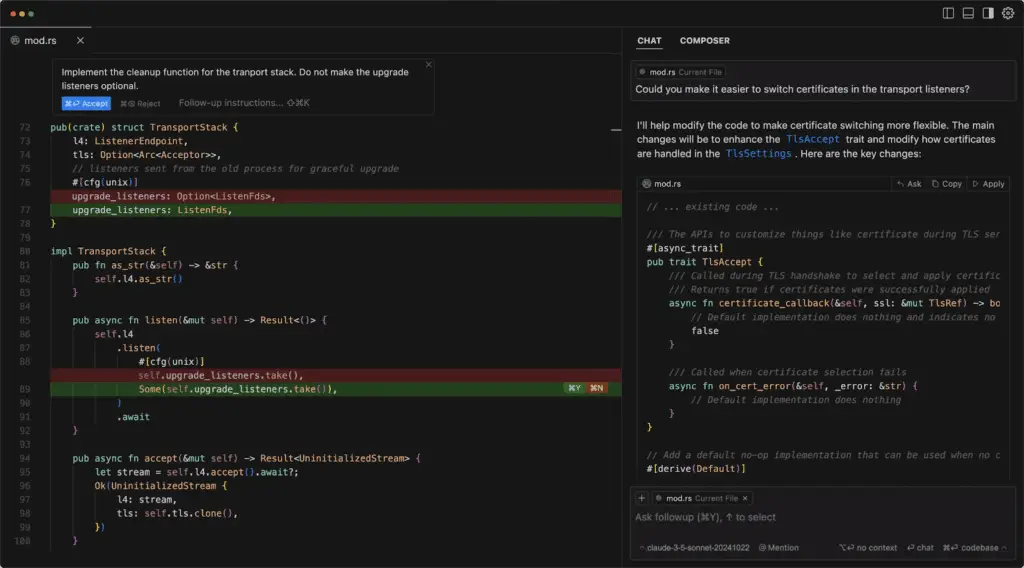
Boost Your Coding Efficiency with Cursor's AI-Powered Code Editor
Cursor is an AI-driven integrated development environment (IDE) designed to streamline the coding process for developers across various platforms. Built as a fork of Visual Studio Code, Cursor integrates advanced AI capabilities to assist in code generation, refactoring, and understanding, thereby enhancing developer productivity.
With Cursor, developers can write code using natural language prompts, allowing for rapid development and modification of codebases. The platform’s AI models, including GPT-4, Claude 3.5 Sonnet, and others, provide intelligent code completions, suggestions, and the ability to understand and navigate large codebases efficiently.
Cursor’s features are tailored to support a wide range of programming tasks, from simple code edits to complex project-wide changes. Its integration with various AI models ensures that developers have access to powerful tools for code analysis, generation, and optimization.
"Cursor AI delivers clear value, especially when it comes to understanding existing code, boosting productivity, and handling multi-file changes."
- Cybernews, from Cybernews review of Cursor
"Cursor has a strong understanding of the project context, so you can refactor or update existing code using simple prompts instead of manual changes."
- Cybernews, from Cybernews review of Cursor
 Key Features:
 Key Features:
-
Tab-Based Autocomplete: Predicts multi-line edits and full code blocks intelligently based on context.
-
Natural Language Code Editing: Modify, refactor, or create new code with plain English prompts and chat commands.
-
Multi-File Smart Rewrites: Apply consistent changes across entire files or projects, saving time on repetitive edits.
-
Agent Mode: Automate complex code transforms and run background tasks with AI agents.
-
Codebase Indexing & Queries: Use AI chat to search, navigate, and update large codebases contextually.
-
AI Code Review: Detect bugs in diffs or PRs automatically with advanced GPT-based review.
-
Privacy Mode & SOC 2 Compliance: Protect sensitive code—nothing stored remotely without consent.
-
VS Code Extension Support: Import your extensions and themes for a familiar setup.
-
Cross-Platform: Works on Windows, macOS, and Linux (x64 and ARM).
 Why Use Cursor?
 Why Use Cursor?
-
Build Faster: Automate boilerplate, refactoring, testing, and debugging with AI assistance.
-
Stay in Flow: Natural language commands reduce context switching, so you stay focused on what matters.
-
Trusted Security: SOC 2 compliance and Privacy Mode keep your code secure and private.
-
Scales With You: Flexible plans for individuals, teams, and enterprises—adaptable to your workload.
-
Future-Ready: Compatible with the latest AI models like GPT‑4, Claude, and Gemini for evolving use cases.
 FAQ
FAQ
 FAQ
FAQWhat is Cursor?
An AI‑powered code editor/IDE that uses natural‑language prompts and autocomplete to write, refactor, and review code efficiently.
What makes Cursor different from GitHub Copilot?
Unlike plugins, Cursor is a standalone IDE with deeper multi‑file editing (“Composer”), chat‑based coding, and integrated AI code review—plus full VS Code compatibility.
Is Cursor free or paid?
According to the last plan, Cursor offers a free Hobby plan (limited usage), Pro at $20/mo with unlimited agents, Ultra at $200/mo for heavy API use, and Team/Enterprise plans from $40/user/mo onward. This may change in the future.
Does Cursor offer integrations?
Yes. Supports VS Code extensions, Slack, BugBot, Shell command execution, and API‑based model options (CLAUDE, GPT, Gemini).
How does Cursor handle privacy?
Includes a Privacy Mode ensuring no remote code retention. SOC 2 certified; enterprise plans enforce privacy organization‑wide.
Level up your Development & Coding workflows
Explore Cursor
Official website


