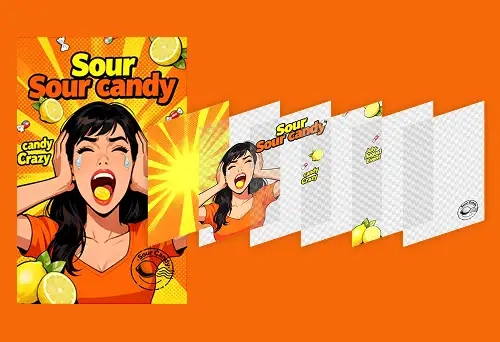
Qwen Image Layer: Layered Decomposition for Inherent Editability
If you’ve ever tried to edit a raster image (a “flat” PNG or JPEG), you’ve felt the core limitation: everything is fused into one canvas. Recolor one object and you accidentally tint the background. Remove an item and you’re stuck patching the hole. Resize a subject and edges warp or bleed. That’s why professional tools lean on layers—but creating those layers manually is slow and requires skill.
Qwen Image Layer (officially Qwen-Image-Layered) tackles that problem directly. Instead of treating an image as a single raster, it uses a diffusion-based approach to decompose one image into multiple editable RGBA layers (color + transparency). Each layer becomes independently movable, recolorable, replaceable, and resizable—without disturbing the rest. This is what the Qwen team calls inherent editability: edits are consistent because content is physically isolated into separate layers rather than “masked” on the same canvas.
In this article, you’ll learn what Qwen Image Layer is, how it works, what edits it enables, real-world use cases, implementation tips, and how it compares to tools like Photoshop workflows and segmentation models such as SAM.
Quick Takeaways (Key Points)
- Qwen Image Layer decomposes an image into multiple RGBA layers, enabling layer-by-layer edits.
- Layers can be independently recolored, resized, moved, removed, or even replaced.
- It supports variable layer counts (e.g., 3 layers or 8+ layers depending on complexity).
- You can do recursive decomposition: decompose a layer into sub-layers for deeper control.
- Unlike segmentation masks, it outputs complete RGBA assets and can reconstruct occluded regions.
- It’s open source and released under Apache 2.0 (commercial-friendly).
What Is Qwen Image Layer?
Qwen Image Layer refers to the capabilities of Qwen-Image-Layered, a model introduced by the Qwen team to transform a single input image into a stack of semantically disentangled RGBA layers. In practical terms, it’s like converting a flattened image into something closer to a layered design file—without manually drawing masks and rebuilding missing background pixels.
From “Flat Raster” to Layer Stack
Traditional image segmentation tools typically output a binary mask per object (object vs. not-object). That can help you select an area, but it doesn’t automatically provide a clean layer with transparency, nor does it restore what’s hidden behind the object.
Qwen Image Layer goes further by producing full RGBA layers. Each output is a transparent image asset where the subject is isolated and the alpha channel defines clean edges. Crucially, it’s designed to support consistent edits because each layer is edited independently, not “painted over” the original raster.
Why “Inherent Editability” Matters
In the Qwen framing, raster images are “entangled”: all content shares the same pixel grid. Layered files are “disentangled”: each element can be edited in isolation. Qwen Image Layer tries to bring layered structure to ordinary images so that elementary operations—like resizing, repositioning, and recoloring—stay high fidelity and don’t corrupt unrelated parts of the image.
Official sources: Qwen blog post and model release pages provide examples of layer-based recoloring, object replacement, text editing, object removal, and repositioning using the layered representation.
Learn more:
Qwen Blog: Qwen-Image-Layered,
Hugging Face Model
How Qwen Image Layer Works (Conceptually)
At a high level, the Qwen Image Layer pipeline turns one image into multiple layers using a diffusion-based decomposition approach. The published paper frames the motivation clearly: layered editing is more consistent because edits can happen on isolated content rather than on a single fused canvas.
Core Steps in Layer Decomposition
- Image understanding: identify semantic elements (background, main subject, foreground objects, text, etc.).
- Disentanglement: separate elements into distinct layers based on structure/semantics.
- Occlusion handling: reconstruct (inpaint) regions that were hidden behind foreground objects, so backgrounds remain editable.
- RGBA generation: output multiple transparent images (RGBA PNG-like layers) that can be composited back into the original.
What Makes It Different From “Just Masks”?
Masks are helpful, but they don’t inherently solve occlusion or produce complete, editable assets. Qwen Image Layer is designed to generate layer stacks, not only object boundaries, and to enable edits that stay consistent because the model works with a layered representation.
Technical reference:
arXiv: Qwen-Image-Layered: Towards Inherent Editability via Layer Decomposition

Key Features of Qwen Image Layer
1) Variable Layer Decomposition
Not every image needs the same number of layers. A simple product photo might only need 3–4 layers (background, product, foreground detail), while a busy street scene might benefit from 6–8+ layers. Qwen Image Layer supports variable-layer decomposition, letting you choose a coarser or finer breakdown depending on your workflow.
2) Recursive Decomposition (Layers Within Layers)
A standout capability is recursive decomposition. After generating a first set of layers, you can pick a layer—say, “the person”—and decompose that layer again into sub-layers (hair, clothing, accessories, etc.). Conceptually, this enables “infinite decomposition” where you refine only what you need without overcomplicating the entire image.
3) High-Fidelity Elementary Operations
Once an image becomes a layer stack, basic edits are much more reliable. Qwen Image Layer is presented as naturally supporting operations like:
- Recoloring a target object without bleeding into background pixels
- Resizing an isolated subject without warping adjacent content
- Repositioning objects freely within the canvas
- Deleting unwanted items cleanly
- Editing text elements that exist on separate layers

What You Can Edit With Qwen Image Layer (Real Workflow Examples)
The Qwen team’s demos and community discussions commonly highlight the same set of practical edits. Below is how these map to real “layer editing” workflows.
Recolor a Single Element (Without Side Effects)
In a flat raster, recoloring often causes halos, spill, or shifts in nearby pixels. With Qwen Image Layer, you apply color changes only to the target RGBA layer while leaving all other layers untouched. This is especially valuable for product variants, branding changes, and fast creative iteration.
Replace an Object (e.g., Swap a Character)
Because the subject is isolated, replacement can focus on a specific layer rather than trying to “overwrite” the full image. In the Qwen examples, a layer containing a person can be replaced (e.g., “girl to boy”) while the rest of the composition remains consistent.
Edit Text in the Image
Text editing is one of the most requested features in image generation and editing. In layered form, text elements can be isolated and modified while keeping the background stable—useful for localization, marketing updates, and signage changes.
Remove Objects Cleanly
Deleting objects from a raster usually requires inpainting and careful cleanup. The layered structure makes removal more straightforward: delete the target layer and rely on reconstructed background regions (where available) to keep the scene coherent.
Resize or Move Objects Without Distortion
When an object is a standalone layer, you can scale or reposition it without stretching other content. This supports layout experiments for banners, thumbnails, and social creatives—where quick composition changes matter.
See official examples:
Qwen blog demo
Use Cases: Where Qwen Image Layer Delivers Immediate Value
E-commerce Product Photography
If you manage product listings, you often need variations: different backgrounds, colors, or compositions. Qwen Image Layer can separate product, shadows/props, and background into layers. That means you can recolor a product layer for variants or swap backgrounds for seasonal campaigns—without reshooting.
Marketing and Creative Teams
For ad creatives, the cost is rarely “making one image.” It’s making ten versions for A/B tests. Layer decomposition accelerates iteration: tweak only the layer you care about (headline text, hero object, background style), keep everything else stable, export multiple variations quickly.
Game Development and Sprites
Indie game workflows often involve creating sprites with transparency and clean edges. Community commentary highlights excitement about generating or extracting assets with alpha channels more cleanly than manual clipping. Qwen Image Layer outputs RGBA layers, which can simplify pipeline steps for sprite prep.
Comics, Manga, and Localization
Layering makes it easier to remove or replace speech bubbles, translate text, and animate panels by separating characters from backgrounds. For creators, the value is control: you keep original art intact while editing only the necessary layer.
Photo Editing and Compositing
Even if you still rely on professional editors for final polish, Qwen Image Layer can reduce the “setup tax” of selections and masks. A fast layer stack can become the starting point for advanced retouching or compositing workflows.
Technical Notes: Model Foundation, Licensing, and Availability
According to the paper, Qwen-Image-Layered is an end-to-end diffusion model for variable-length RGBA layer decomposition, designed to improve decomposition quality and editing consistency. The paper also describes components such as an RGBA-VAE and an architecture supporting variable layer counts.
- Paper: Qwen-Image-Layered (arXiv 2512.15603)
- Model: Hugging Face: Qwen/Qwen-Image-Layered
- Demo Space: Hugging Face Space: Try Qwen Image Layered
- Code: GitHub: QwenLM/Qwen-Image-Layered
- Official blog: Qwen Blog: Layered Decomposition for Inherent Editability
Commercial use: The project is released under Apache 2.0 (as stated on the official repositories/model pages), which generally permits commercial usage while maintaining license requirements (e.g., notices).
Implementation Overview (Practical Guide)
Qwen Image Layer is commonly used through a Hugging Face Diffusers pipeline. The exact installation steps can evolve, so always verify the latest README and model card. That said, the typical workflow is:
Recommended Hardware
- GPU VRAM: 8GB minimum (16GB+ recommended for smoother iteration)
- RAM: 16GB+ recommended
- Use case tip: Start at lower resolution/layer count, then increase as needed.
Workflow Tips for Better Results
- Start with fewer layers (e.g., 3–4). If key elements are merged, increase layer count.
- Use recursive decomposition when one layer contains multiple important sub-elements.
- Keep edits local: apply changes only to the target layer to preserve global consistency.
Qwen Image Layer vs Photoshop and SAM
Qwen Image Layer vs Manual Photoshop Layering
Photoshop can do everything—if you invest the time. Qwen Image Layer aims to automate the most time-consuming part: building a clean layer stack from a flat image. The trade-off is that manual tools still win for pixel-perfect control, while Qwen Image Layer wins for speed, iteration, and batch workflows.
Qwen Image Layer vs Segment Anything (SAM)
SAM is famous for segmentation, but segmentation alone is not a complete editing workflow. The key difference is output: SAM provides masks, while Qwen Image Layer provides complete RGBA layers and is positioned for direct editability and occlusion-aware reconstruction.
| Feature | SAM (segmentation) | Qwen Image Layer |
|---|---|---|
| Output | Masks | RGBA layers |
| Transparency assets | Not directly | Yes |
| Occlusion reconstruction | No | Designed for it |
| Editing workflow | Requires additional steps | Layer-first editing |
Custom Visual Concepts (For Your Blog Images)
Below are 3 custom image/diagram concepts you can create (or ask a designer to create) to explain Qwen Image Layer clearly. Each includes SEO-friendly alt text.
1) “Flat Image vs Qwen Image Layer Stack” Diagram
Description: A split graphic: left side shows a single flattened image labeled “Raster (Entangled)”. Right side shows the same image separated into 5 transparent RGBA layers stacked vertically (Background, Subject, Text, Foreground Object, Highlights). Include arrows showing “Edit only Layer 3” to recolor text without changing other layers.
Alt text: Qwen image layer diagram showing image decomposed into editable RGBA layers
2) “Elementary Operations on One Layer” Infographic
Description: A 4-panel infographic using the same decomposed scene: Panel A “Original”, Panel B “Recolor Layer”, Panel C “Resize Layer”, Panel D “Move Layer”. Add a small label: “Other layers unchanged”.
Alt text: Qwen image layer editing example recolor resize move without affecting other layers
3) “Recursive Decomposition” Flow
Description: A flow diagram: Input Image → Decompose into 4 layers → Select “Subject layer” → Decompose again into 3 sub-layers (Hair, Clothing, Accessories). Show this as a branching tree to convey “layers within layers”.
Alt text: Qwen image layer recursive decomposition layers within layers workflow
Frequently Asked Questions (FAQ)
1) What does “RGBA layers” mean in Qwen Image Layer?
RGBA layers store Red, Green, Blue, and Alpha (transparency). In Qwen Image Layer, each output layer is a complete transparent asset so you can edit it independently and recompose the final image.
2) How is Qwen Image Layer different from segmentation?
Segmentation typically outputs masks. Qwen Image Layer outputs full RGBA layers and is designed to support consistent layer-based edits, including handling occluded background regions.
3) Can Qwen Image Layer replace Photoshop?
For many workflows—selection/masking setup, rapid iteration, batch variations—Qwen Image Layer can reduce or replace manual steps. For pixel-perfect retouching and fine manual control, traditional editors may still be valuable.
4) How many layers should I generate?
A good starting point is 3–4 layers for simple scenes and 6–8 layers for complex scenes. If one layer still contains multiple important elements, use recursive decomposition for finer control.
5) Is Qwen Image Layer open source and usable commercially?
Yes. The official releases list an Apache 2.0 license, which is generally friendly for commercial use (review the license terms and required notices for your project).
Conclusion: Why Qwen Image Layer Is a Big Deal for Editing Workflows
Qwen Image Layer reframes image editing around the concept professional designers have relied on for decades: layers. By decomposing a single image into multiple RGBA layers, it introduces a path toward consistent, high-fidelity edits that don’t spill into unrelated content. The ability to choose a variable number of layers—and to recursively decompose layers into sub-layers—adds flexibility that suits both quick edits and deep refinement.
For e-commerce, marketing, games, and comics, the appeal is straightforward: less time spent on tedious masking and cleanup, more time spent iterating on the creative decisions that matter. And because Qwen Image Layer is available through public releases and a demo space, it’s easier than ever to test whether layer decomposition fits your workflow.
Next step: Try the demo, experiment with 3–4 layers first, then increase layer count or apply recursive decomposition when you need more granularity.
Try it here:
Qwen Image Layered Demo (Hugging Face Space)
Engagement: Share Your Results
Have you tested Qwen Image Layer on your own images yet? What’s the first workflow you’d want to upgrade—product photos, social creatives, sprites, or comic localization? Share your experience (and what surprised you) and consider sending this article to a teammate who spends too much time masking and cleaning up edits.