AirBrush AI
AI photo editor for fast retouching, background removal, and HD upscaling
Category:
Design & CreativityPricing:
Freemium
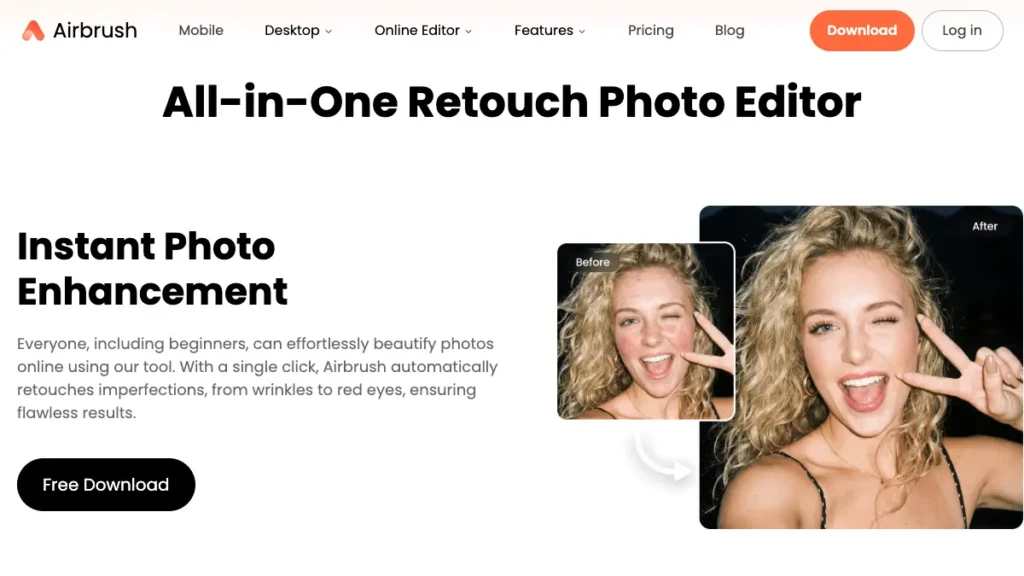
AI photo editor for flawless portraits - fast on web and mobile
AirBrush AI is a portrait-focused photo editor built around one-tap retouching, background cleanup, and image upscaling, designed for creators, small sellers, and social teams who need polished visuals without Photoshop-level skills. It covers skin smoothing, blemish removal, teeth whitening, tone and color fixes, object erase, and intelligent HD enhancement, turning casual phone photos into studio-quality results in minutes. A free tier unlocks core edits, while paid plans raise usage limits and open premium effects like AI Outfit and AI Retouch.
The tool runs inside any browser plus dedicated desktop apps for Mac and Windows and mobile apps for iOS and Android, with no GPU or specialized hardware required. The interface leads with presets and adjustable sliders, so ramp-up is minimal even for non-designers. Inputs are standard photos or short videos; exports come out as JPG, PNG, or common video formats that drop directly into your CMS, marketplace, or social scheduler without rework, which is part of why it earns a place in many Design & Creativity stacks.
On security, edits run over encrypted connections and you can manage or delete library assets at will. For scalability, credit bundles and subscription tiers cover higher monthly volumes, batch-friendly desktop sessions speed repetitive edits, and frequent model updates keep features like background refine and AI upscaling current. One editorial caveat worth knowing: AirBrush AI is optimized for mobile-first, portrait-heavy Image Editing, so users who need granular masking, layer-based control, or truly professional-grade headshot realism may find the slider-and-preset approach limiting. Several reviewers testing the AI Headshot feature in particular noted inconsistent likeness results compared with dedicated desktop suites, something worth confirming on your own samples before committing to a paid plan.
"I have been using AirBrush for years and it is by far the most advanced photo editing application that I have ever used."
- AirBrush user, Apple App Store review
"This is the best photo editing app have ever tried! It doesn't make your picture look over edited like most of the photo editing apps do!"
- AirBrush user, Apple App Store review
 Key Features:
 Key Features:
- Portrait Retouch Suite: Skin smoothing, blemish fix, teeth whitening, tone and color control.
- Object & Background Cleanup: Remove stray objects or refine backgrounds for marketplace ready shots.
- AI Upscaler: Enhance resolution and detail for print quality results.
- Makeup & Face Editor: Natural looking makeup looks plus subtle face shaping controls.
- Templates & Presets: Speed up edits with one tap looks optimized for social and ecommerce.
- Cross Platform: Web, desktop, and mobile apps - no pro hardware needed.
 Why Use AirBrush AI?
- Fast results: Publish portrait ready images in minutes with minimal training.
- Brand consistency: Presets and repeatable sliders keep a uniform look across campaigns.
- Low overhead: Free tool entry with affordable tiers and no GPU investment.
- Flexible workflows: Use web for quick edits or desktop for batch friendly sessions.
- Future proof: Ongoing AI improvements add new retouch and cleanup capabilities.
 FAQ
FAQ
What is AirBrush AI?
AirBrush AI is an AI photo editor focused on portrait retouching, object cleanup, and upscaling - available on web, desktop, and mobile.
What makes AirBrush AI different from competitor Facetune?
AirBrush AI balances quick one tap presets with granular sliders, includes background cleanup, and offers browser, desktop, and mobile options to match different workflows.
Is AirBrush AI free or paid?
Freemium. Start with a free tool tier for core edits and upgrade to paid plans for higher limits and premium effects.
Is AirBrush AI offering integrations?
AirBrush AI fits into existing pipelines via standard exports like JPG and PNG for CMS, DAM, and marketplace uploads. Desktop tools support faster batch sessions.
How is AirBrush AI handling privacy?
Edits are processed over encrypted connections, and you can manage or delete assets in your account. Review official policies before uploading sensitive content.
Level up your Design & Creativity workflows
Explore AirBrush AI
Official website
Best Alternatives to Airbrush AI
Discover similar tools to enhance, retouch, and improve image quality with AI.
Let’sEnhance
AI-powered tool to improve image resolution and quality.

ImgLarger
Upscale images without losing quality using AI.

Remini
Enhance photos with advanced AI sharpening and restoration.
VanceAI
All-in-one suite for image enhancement and upscaling.